Hey everyone, if you’re hanging around the thermal space like we are (we’re a thermal solutions supplier, for anyone who’s new here), you’ve probably noticed that “thermal solutions” is such a vague term. Most folks just think of things that stop their electronics from overheating, but there’s actually a whole world of different options out there, each built for totally different use cases. I’ve worked with dozens of clients over the years—from startup PC builders to massive aerospace teams—and a common mistake I see is grabbing the first thermal product they find without checking if it fits their specific needs. That’s why today we’re breaking down the most common thermal solutions, what they’re good for, and when you actually need to reach for each one. Thermal Solutions

First up, let’s talk about the basics: why thermal solutions even matter. Whether you’ve got a tiny smartwatch chip crammed in a case, a gaming PC pushing out 500W, or a satellite spinning 200 miles above Earth, all electronics generate heat as they run. Too much heat = slower performance, shorter lifespan, or even a full system meltdown. Thermal solutions are just the tools that move that excess heat from where it’s generated (usually the chip or component) to somewhere it can dissipate into the air, no matter the environment. Alright, let’s dive into the types, starting with the ones most people run into every single day.
Heat Sinks: The OG Thermal Workhorse
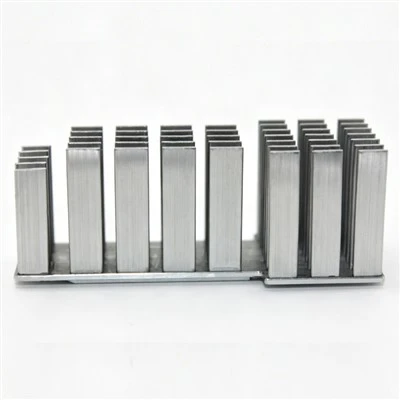
If you’ve ever pulled open a laptop or gaming PC, you’ve definitely seen a heat sink. These are probably the most common thermal solutions on the market, and for good reason—they’re simple, reliable, and work way better than most people give them credit for. A heat sink is basically a block of metal (usually aluminum or copper, copper for better heat transfer) with a bunch of fins sticking out. The base of the heat sinks sits directly on the component, and the fins give the heat a lot more surface area to transfer to the air around it. That’s the key, right? More surface area = faster heat dissipation.
Now, there are a few different flavors of heat sinks, depending on what you need. The ones you see in consumer PCs are often passive heat sinks, meaning they don’t have a fan attached. They rely just on natural convection—warm air rises, cool air takes its place—to move heat away. That’s great for low-power components: like a CPU in a basic office laptop or a Raspberry Pi. If you’ve ever used a Raspberry Pi, you probably added a tiny stick-on heat sink to the processor to prevent throttling when you run a program that uses a lot of power, right? That’s a passive heat sink, super cheap, easy to install, no extra noise.
But for higher-power stuff, like a gaming PC CPU that’s pushing 100W or a high-end server, passive heat sinks just don’t cut it. So you get active heat sinks—same metal fins, but with a small fan bolted to the top to blow air through the fins, speeding up convection a ton. These are the little noisy (or not so noisy, if you get a good one) coolers you see on gaming PCs, and they work really well for a lot of mid-range applications.
One thing I always tell clients is that heat sink performance depends on more than just the metal. The contact between the heat sink and the component is super important too. If there’s an air gap there, air is a terrible heat conductor, so all that heat gets stuck. That’s why you need thermal interface material (we’ll get to that in a sec) to fill in those tiny gaps. Skip that, and even the best heat sink will underperform.
Thermal Grease & Pads: The Unsung Heroes of Contact
Okay, let’s talk about the stuff that makes heat sinks actually work. Thermal interface materials (TIM) are a whole category of their own, and the most common ones are thermal grease and thermal pads. These are the things that fill in those microscopic gaps between a component and a heat sink (or whatever other thermal solution you’re using) so there’s no air trapped, which would block heat transfer.
Thermal grease is the old faithful here—most PC builders know it as that gray or white goop you spread in a thin layer on your CPU before slapping on the heat sink. Grease is usually made of a base like silicone or epoxy, mixed with conductive particles like zinc oxide, aluminum oxide, or even silver, to boost heat transfer. The best thing about grease is that it’s conformable, so it fills in every tiny bump and scratch on the component or heat sink base, which makes for super consistent contact. It’s also pretty cheap, easy to apply (as long as you don’t use too much—thin is key!), and works for almost every low to mid-power application.
But grease has downsides. Over time, especially if you’re dealing with a system that heats up and cools down a lot, the grease can dry out, crack, or pump out (that’s when the thermal paste gets pushed out to the edges of the component over time, leaving gaps). That’s a huge problem for long-term reliability, like in servers or embedded systems that run 24/7. Also, some people don’t like the mess—if you get grease on your motherboard, it can cause a short, so you have to be careful when applying it.
That’s where thermal pads come in. Thermal pads are basically thin, solid sheets of the same conductive material as grease, but they’re pre-formed, no spreading needed. They’re soft, so they compress between the component and heat sink, filling in gaps just like grease, but they don’t dry out over time. That makes them perfect for applications where you don’t want to deal with re-applying grease every few years, or for components that have weird shapes or multiple small contact points (like RAM modules or graphics cards with lots of tiny chips spread across the board). The downside of thermal pads is that they’re not as conformable as grease, so if there are really deep gaps, they might not fill them all the way, and their performance is a little lower than the best thermal greases. For most consumer and industrial applications, though, they’re totally fine.
Heat Pipes & Vapor Chambers: For the Big Guys
If you’ve got a component pushing more than 150W, like a top-of-the-line gaming GPU, a server CPU, or even some electric vehicle batteries, heat sinks and TIM just won’t cut it. That’s when you need something more powerful: heat pipes or vapor chambers. These are the thermal solutions built for moving a lot of heat over longer distances, not just dissipating it right next to the component.
Let’s start with heat pipes. A heat pipe is a sealed copper or aluminum tube, partially filled with a working fluid (usually water, sometimes acetone or ammonia, depending on the temperature range). The inside of the tube has a wicking structure, like a mesh or sintered metal. Here’s how it works: when the component heats up one end of the heat pipe, the fluid at that end evaporates into gas. Gas moves to the cooler end of the pipe, where it condenses back into liquid, and the wick pulls the liquid back to the hot end to start the cycle over. It’s basically a passive, super efficient way to move heat from point A to point B, way more efficient than just using a solid metal rod. You’ll see heat pipes in almost every high-end laptop and gaming GPU—they’re the copper tubes running from the chip to the heat sink fins.
Vapor chambers are like big, flat, 2D versions of heat pipes. Instead of a tube, it’s a thin, sealed flat plate, with the same working fluid and wicking structure. The big advantage here is that it spreads heat evenly across a larger area. If you’ve got a component that’s hot in the center and cooler around the edges (which most are), a vapor chamber will pull all that heat from the center and spread it out so the entire heat sink base gets heated evenly. That means the whole heat sink fins can dissipate heat, not just a small section. Vapor chambers are super popular in space-constrained devices, like slim gaming laptops, or applications where you need to spread heat over a large surface, like LED lights or high-power radar systems.
One thing I love about heat pipes and vapor chambers is that they’re 100% passive too, no moving parts. That means less noise, less maintenance, and fewer points of failure. Way better than using multiple fans to move heat around, especially for high-power systems where fan noise can be a huge issue.
Liquid Cooling: For Extreme Heat Loads
Okay, so we’ve talked about heat sinks, TIM, heat pipes, vapor chambers—but what if even those aren’t enough? Like, if you’re running a custom liquid-cooled gaming PC that pushes 300W, or an industrial machine that’s generating hundreds of watts of heat, or even a data center with thousands of servers. That’s where liquid cooling comes in. This is the thermal solution that’s used for the most extreme heat loads, and it’s way more efficient than air-based solutions because liquids conduct heat way better than air.
Liquid cooling systems work by circulating a fluid (usually water, sometimes mixed with antifreeze or other additives) through a loop that’s attached to the component. The fluid absorbs heat from the component, then flows to a radiator, where fans blow air through the radiator fins to cool down the fluid. The cooled fluid then cycles back to the component, repeating the process. Simple enough, right?
There are two main types of liquid cooling: all-in-one (AIO) and custom loops. AIO coolers are the ones you can buy off the shelf at a PC store—they’re pre-assembled, have a pump, radiator, and hoses, and are super easy to install. They’re way more efficient than air coolers for high-power CPUs or GPUs, and they’re pretty reliable, with most AIOs lasting 5-7 years. Custom liquid loops are for people who want to build something super powerful, like overclocked gaming rigs or high-end workstations. They let you pick every part: the size of the radiator, the type of pump, even dye the fluid for aesthetics. But they’re more expensive, require more maintenance, and there’s a higher risk of leaks that can damage your hardware.
Liquid cooling isn’t just for gaming PCs, either. We work with a lot of industrial clients who use liquid cooling for things like CNC machines, power inverters, and even electric vehicle batteries. For EVs, liquid cooling is critical—batteries work best within a narrow temperature range, so you have to cool them when they’re running hard or charge too fast, and heat them when it’s cold outside. That’s why most modern EVs have complex liquid cooling systems built right into the battery pack.
Passive vs. Active: The Big Tradeoff
Before we move on, let’s talk about a key thing that ties all these solutions together: passive vs. active cooling. Every thermal solution falls into one of these two categories, and picking the right one is make-or-break. Passive solutions (heat sinks, heat pipes, vapor chambers, some liquid cooling setups) have no moving parts, so they’re quiet, reliable, and low-maintenance. But they’re less efficient, so they only work for lower heat loads. Active solutions (fan-cooled heat sinks, the fans in AIO liquid cooling systems) have moving parts, so they’re more efficient, can handle higher heat loads, but they make noise, need maintenance (like replacing fans or lubricating pumps), and have a shorter lifespan.
I always advise clients to go passive if they can—no one wants a noisy system, and less moving parts mean less chance of something breaking. But if your component is pushing more than 100W, you’re probably going to need to add active cooling. It’s just the cost of dealing with high power.
Other Common Thermal Solutions (Don’t Sleep On These)
Wait, we’ve covered the big ones, but there are a few other thermal solutions that come up all the time, and they’re easy to overlook. Let’s go through those quick.
First, thermal tapes and adhesives. Sometimes you can’t bolt a heat sink or heat pipe to a component, either because it’s too small, too fragile, or you need a quick, low-cost installation. Thermal adhesive is a conductive glue that bonds two surfaces together while also transferring heat. It’s usually stronger than just a TIM, so it’s good for keeping components fixed in place, like tiny surface-mount chips on a circuit board. Just make sure you pick a thermal adhesive with good thermal conductivity—some are just regular glue with a little filler, so they won’t do much for heat transfer.
Then there are thermal gap fillers. These are similar to thermal pads, but they’re even softer, so they can fill in really uneven gaps between components, like between a tall CPU and a heat sink that’s not perfectly aligned. They’re great for applications where you have multiple components that need to be cooled at the same time, like a motherboard with a CPU, GPU, RAM, and chipset all generating heat. Gap fillers compress to fit the space, so they make contact with every component, without needing to be cut to size like a thermal pad.
And let’s not mention thermoelectric coolers (TECs), sometimes called Peltier coolers. These are wild—they’re solid-state devices that move heat from one side to the other when you run electricity through them. That means they can actually cool a component below ambient air temperature, which is something no other thermal solution can do. They’re super useful for things like laser diodes, medical sensors, or even some high-end gaming setups that want to push a CPU to its absolute limit. The downside? They’re less efficient than other solutions, require a lot of power, and they can be tricky to work with, because the cold side can attract condensation if you’re not careful.
How to Pick the Right One For Your Project
At the end of the day, picking the right thermal solution comes down to three main things: your heat load, your space constraints, and your environment. Let’s break that down super simply. If you’ve got a low-power component in a small space, and you don’t want to deal with noise or maintenance, go with a passive heat sink plus thermal paste or pad. If you’re dealing with mid-range power, heat pipes or a compact AIO liquid cooler will work great. For high-power or extreme heat loads, full custom liquid cooling, vapor chambers, or heat pipes paired with active fans are the way to go.
And always, always test. No matter what solution you pick, run tests under real-world conditions—don’t just go off spec. We’ve had clients come to us saying a solution is supposed to handle 200W, but when they tested it, it only could handle 150W because of bad contact or poor air flow around the component.
If you’re still unsure what you need, that’s where we come in. We’re a thermal solutions supplier, and we’ve helped hundreds of clients—from startup engineers to Fortune 500 companies—find the perfect thermal setup for their projects, no matter how big or small. Whether you need a tiny thermal pad for a smart sensor, a heat pipe for a server, or a custom liquid cooling loop for a supercomputer, we’ve got the expertise and the products to make it work. We don’t do one-size-fits-all, because we know every project is different. If you’re working on a project and hitting a heat problem, or you want to upgrade your current thermal setup, reach out to us to chat through your needs. We’re happy to help, no sales pressure, just real advice from people who live and breathe thermal solutions every day.
Cold Plate Heat Sink References:
- ASME International. (2020). Thermal Management Handbook for Electronic Systems.
- Incropera, F. P., et al. (2021). Fundamentals of Heat and Mass Transfer (8th ed.). Wiley.
- Electronic Industries Alliance. (2019). Standard for Thermal Interface Materials for Electronic Assemblies.
- Moore, A. L., & Shi, L. (2014). Emerging challenges and materials for thermal management of electronics. Materials Today, 17(4), 163-174.
- American Society for Testing and Materials. (2022). Standard Test Method for Thermal Conductivity of Solids by means of the Guarded-Comparative-Longitudinal Heat Flow Technique.
Dongguan Pioneer Thermal Technology Co., Ltd.
Dongguan Pioneer Thermal Technology Co., Ltd. is one of the most professional thermal solutions manufacturers and suppliers in China. With abundant experience, we warmly welcome you to buy customized thermal solutions made in China here from our factory. If you have any enquiry about quotation and free sample, please feel free to email us.
Address: Xiegang Village, Xiegang Town, Dongguan City, Guangdong Province, 523596, China
E-mail: vivian@ptheatsink.com
WebSite: https://www.coolingheatsink.com/
