If you work in the flexible packaging or conversion industry, a bag making machine is the beating heart of your operation. When it starts acting up—skipping welds, jamming film, or throwing error codes—downtime isn’t just an inconvenience: it hits your on-time delivery rates, eats into profit margins, and can even strain relationships with clients who rely on you. After 12 years as a bag making machine supplier, I’ve seen every electrical glitch imaginable. Some are tiny, easy fixes that take 10 minutes. Others are more complex, but almost never require calling in a 24/7 field service tech at 2 a.m. (though if you do need that, we’re here, of course). Bag Making Machine
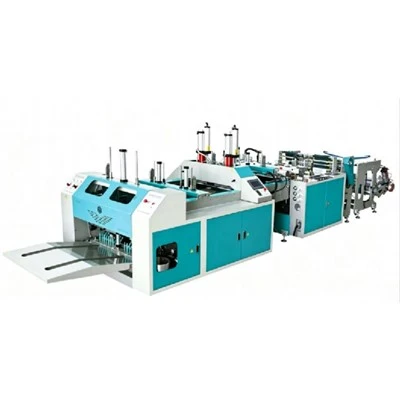
This post is built on real troubleshooting steps we share with every customer when they call us in a pinch. We’re not talking about replacing a control board blind here—we’re walking through systematic, safe ways to narrow down the problem, starting with the simplest checks before moving to more technical ones. Safety first, always: before you do anything, lock out and tag out the machine’s power source. No exceptions. I can’t tell you how many times a new operator has forgotten this and leaned into the machine while fiddling with a wire. Don’t be that person.
Start with the Obvious: Power and Basic Connections
I once had a customer text me at 8 a.m., panicking because their flat-bottom bag maker wouldn’t run. I asked a few quick questions, and turns out, the night shift operator had tripped the machine’s dedicated circuit breaker when they cleared a jam, then forgot to flip it back on. Half the time, electrical issues aren’t issues at all—they’re just something small overlooked.
First, confirm incoming power. Bag making machines run on specific voltage (usually 208V to 480V, depending on size) and phase, so pull a multimeter and test the main power terminals at the disconnect switch. If you’re reading zero or uneven voltage, check the building’s main breaker for the machine: sometimes it trips on an overload, especially if you were running a heavy production run the day before. If that breaker holds, test the machine’s internal main power fuse (or fuses—many large machines have two: one for the control panel, one for the drive systems). A blown fuse isn’t always a sign of a catastrophic failure, but it’s a red flag: if it blows again as soon as you replace it, you’ve got a short circuit somewhere, not just a bad fuse.
Next, check all loose connections. Vibration from the machine’s motors and rollers works wires loose over time, especially in the control cabinet. Turn off the power, open the cabinet, and inspect terminal blocks, wire harnesses, and connection points for the PLC (programmable logic controller)—the “brain” of the machine. I’ve seen wires rattle loose from the limit switches that tell the machine where to position the film, or from the motor drives that power the sealing heads. Even a single loose ground wire can cause all sorts of weird issues: error codes that pop up randomly, motors that stutter, or sensors that won’t read correctly. Tighten connections gently—don’t over-torque them, that’s a quick way to strip terminals and create a new problem.
Sensors: The Most Common Culprit for Glitches
Sensors are the eyes and ears of a bag making machine, and they cause more electrical problems than any other component I’ve encountered. Whether it’s a photoelectric sensor tracking the registration marks on the film, a proximity sensor detecting a part position, or a temperature sensor for the hot air sealing system, if a sensor fails, the machine stops dead or produces bad bags.
Let’s start with photoelectric sensors, which are responsible for aligning the film so your bag has straight seams and correct sizing. If you’re getting a “registration error” code, the first step is to test the sensor itself. Most bag machine sensors have a built-in LED that lights up when it’s detecting the target (the black registration mark on the film). If the LED isn’t on, or it’s flickering, that means the sensor isn’t picking up the mark. First, clean the sensor lens—dust, film residue, and ink build up on those tiny lenses all the time, especially in high-humidity environments. A quick wipe with a soft, lint-free cloth and isopropyl alcohol usually fixes that. If cleaning doesn’t work, check the sensor’s alignment: if it’s shifted even a fraction of an inch off the mark, it won’t read correctly. Adjust it slowly, test as you go, and confirm that the LED is steady.
Proximity sensors, which detect things like the position of the cutting blade or the sealing head, are another common headache. If the machine is throwing an error like “home position lost,” or it’s misaligning parts randomly, the proximity sensor is often the issue. These sensors work on magnetic or inductive technology, so metal shavings from machine wear can build up on their face, blocking their signal. Again, clean the sensor face first. If that doesn’t help, test the distance between the sensor and the metal target it’s supposed to detect. Most proximity sensors have a specified operating range—if the target is too close or too far, it won’t trigger correctly. Adjust the target’s position slowly until the sensor’s LED illuminates steadily, confirming it’s registering. For older machines, sometimes proximity sensors just wear out over time—their signal weakens until they can’t pick up the target anymore, and replacing them is a cheap, easy fix.
Drive Motors and Motor Drives: Powering the Moving Parts
If the machine is getting power, sensors are fine, but parts aren’t moving, the issue is usually with the drive motor or its drive unit (the variable frequency drive, or VFD, that controls motor speed). I once had a customer who was producing 1,000 bags an hour when their main film feed motor stopped mid-cycle. We checked all the sensors, the power, the connections, and finally realized the VFD had overheated and tripped its internal safety. Bag making machine VFDs are housed in the control cabinet, and if the cabinet’s cooling fan is clogged with dust or stops working, the VFD overheats and shuts down to prevent damage.
Start with a visual check of the drive motors. If you can hear the motor humming but it won’t turn, that’s a sign it’s getting power but not engaging. First, check the motor’s thermal overload switch—most motors have a manual reset button on their housing that trips when the motor overheats from a jam or excessive load. Press that reset, wait a minute, and test the motor. If it works, you’ll want to figure out why it overheated: was there a film jam that made the motor work too hard, or is the VFD set to the wrong frequency, causing the motor to draw too much current?
If the motor isn’t getting power at all, use your multimeter to test the output of the VFD. Make sure the VFD is powered on and set to the correct frequency for that motor (different functions on the machine—film feed, cutting, sealing—require different speeds). If the VFD is outputting voltage, the motor is likely bad, and you’ll need to replace it. If there’s no output, the VFD itself might be faulty, or there’s a loose wire between the VFD and the motor. For belt-driven machines, also check the drive belt to make sure it hasn’t slipped or broken—sometimes electrical issues present like mechanical problems, so it’s worth ruling that out before tearing into the electronics.
PLC and Control Panel Issues: The Machine’s Brain
If you’ve checked all the above, and the machine is still throwing random error codes or not performing as expected, the problem might be the PLC or the control panel’s touchscreen. PLCs are built to run for years, but they can suffer from memory errors, loose internal connections, or even software glitches that cause weird behavior.
A common fix for PLC glitches is a power cycle. Turn off the main power, disconnect it for 10 full minutes, then turn it back on. This resets the PLC’s memory and clears any temporary errors that might be stuck. If error codes keep coming back, write them down—don’t just ignore them. PLC error codes are specific, and that code tells you exactly where to look. For example, a code that says “sensor 3 out of range” will point you straight to that third sensor, instead of guessing which part is faulty.
If the touchscreen on the control panel is unresponsive or lagging, that’s usually a separate issue from the PLC. It could be a dirty screen, a loose ribbon cable connecting the screen to the control board, or a faulty touchscreen component. Again, power cycle the machine first—sometimes the touchscreen just needs a reset. If it’s still unresponsive, check the ribbon cable at the back of the screen; those can come loose when the screen is jostled or the control cabinet is opened frequently. If the cable is tight and the screen still doesn’t work, it’s likely time to replace the touchscreen.
When to Call in Backup, and How to Avoid Issues Long-Term
The troubleshooting steps above work for 80% of the electrical issues we see with bag making machines. But if you’ve tried all of these and the machine is still down, it’s time to reach out to a qualified technician, or to us if you need support. One of the biggest mistakes we see customers make is trying to work on a machine they don’t have experience with, which can turn a small issue into a major breakdown that costs thousands of dollars in repairs and downtime.

That said, there are simple things you can do to prevent electrical issues in the first place. First, schedule regular maintenance: every 3 months, check all connections, clean all sensors, and test the VFDs and motors. Second, keep the control cabinet clean and well-ventilated—dust is the number one enemy of electrical components, and a clogged cabinet fan will lead to overheating and failures. Third, train your operators on basic troubleshooting: teach them how to reset breakers, check sensor lenses, and write down error codes, so they can handle small issues before they become big ones.
Film Blowing Machine At the end of the day, a bag making machine’s electrical system is a network of simple, connected parts, not black magic. Most issues are small, easy to fix, and avoidable with a little regular care. If you’re dealing with a persistent electrical problem, or you’re looking to upgrade your current machine to reduce downtime and improve efficiency, we’re here to help. We work with brands across all sectors, from small custom bag shops to large packaging facilities, and we’ve got the expertise to get your line up and running fast. Whether you need on-site support, remote troubleshooting, or a new bag making machine tailored to your production needs, don’t hesitate to reach out to our team to discuss your requirements.
References
- European Machinery Manufacturers Association. (2021). Safety Standards for Flexible Packaging Conversion Equipment.
- Siemens Industry. (2022). Troubleshooting Variable Frequency Drives for Packaging Machinery.
- Packaging Machinery Association. (2020). Maintenance Guidelines for Automated Bag Making Equipment.
- Allen-Bradley. (2021). PLC Error Code Reference for Industrial Packaging Machines.
Ruian Jianhao Precision Machinery Co., Ltd.
As one of the most professional bag making machine manufacturers and suppliers in China, we’re featured by quality products and good price. Please rest assured to wholesale durable bag making machine for sale here from our factory. Welcome to contact us for customized service and quotation.
Address: No. 8, Jianshe Road, Beiyu Village, Shangwang Street, Ruian City, Wenzhou City, Zhejiang Province
E-mail: 1832333027@qq.com
WebSite: https://www.jianhaomachinery.com/
