Hey folks, let’s cut to the chase—if you’re running an office, how many times has your power gone out mid-work? I’m the go-to guy for UPS backup power stations, and every single week I get the same question: “Can these actually work for our office, or are they just for server rooms and data centers?” Spoiler: They’re made for offices, but most teams don’t realize that. Let’s break this down like we’re chatting by the coffee machine after a chaotic blackout that killed a big client presentation. UPS Backup Power Stations
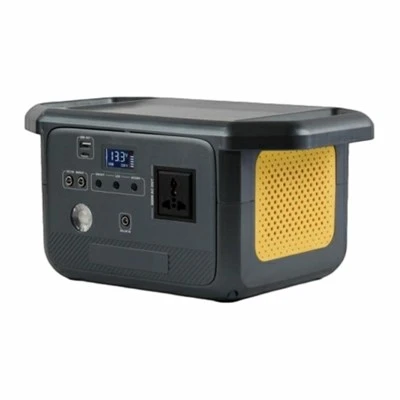
First, let’s get rid of the myth that UPS is only for data centers. Yeah, data centers use huge, industrial UPS systems—but that’s because they’ve got hundreds of servers running 24/7. Your office has computers, printers, security cameras, the fridge that holds everyone’s matcha lattes, and maybe a fancy AV setup for team meetings. All of that stuff hates power outages, and more than that, they hate dirty power. Dirty power is that weird blip where the voltage spikes or drops for half a second—you can’t see it, but it fries hard drives, corrupts spreadsheets, and makes your $800 monitor die 6 months early. A good UPS doesn’t just kick in when the power goes out—it filters that garbage power before it ever touches your devices.
Let’s talk numbers, because office teams love quick stats (don’t lie, you scroll for the charts too). A typical 50-person office has about 100 devices that need reliable power: desktops, laptops (wait, laptops have their own batteries, but what about the docking stations that connect to the office network? Docking stations go down hard when power cuts), network switches, wireless access points, the door access system, and that conference room projector that’s been finicky since 2021. A mid-sized UPS unit—something we sell for small to mid offices—has a runtime of 15 to 30 minutes for that exact load. Wait, 15 minutes sounds short? But here’s the thing: Most office power outages are fixed in under 10 minutes by the utility company. That’s exactly what that UPS is there for—you don’t need to run your whole office on battery for hours, just long enough to save your work, shut down servers properly, and not lose that big Q3 report you were editing.
I recently had a client—let’s call them a marketing firm in Austin—who swears by their UPS now. They had a blackout last summer during a brutal thunderstorm. One of their account managers was 2 minutes away from finishing a campaign deck for a $50k client, and their desktop died because the power blinked right as they hit “save.” Before we installed their UPS, that’s the third time that had happened in 6 months. Now? When the power cuts, the UPS kicks in instantly—no downtime, no panic. They even kept their conference room AV running long enough to wrap up a client call that was scheduled during the outage. That’s the real win for offices: it’s not just about avoiding lost work, it’s about keeping business moving without stopping.
Wait, but what about bigger offices? Like a 200-person corporate HQ? Yeah, we have custom UPS setups for that too. A lot of larger offices have a “common area” UPS that covers the lobby security, the elevator access, and the main server closet for the whole office. If that goes down, the whole building’s access locks and you can’t get in to work. For those, we use modular UPS units—you can add more battery packs as your team grows, so you’re not paying for extra power you don’t need right now. Modular is also great because if one part breaks, you don’t have to shut the whole thing down to fix it—just swap out the bad module like replacing a light bulb. No more waiting 3 days for a tech to come reboot your whole office power system.
Let’s address the big concern people have: cost. I get it, office budgets are tight, and “unexpected power costs” aren’t in next quarter’s line item. Let’s do the math on that Austin marketing firm I mentioned earlier. Before the UPS, they were spending an average of $1,200 a month on downtime: missed deadlines, client penalties for late deliverables, even one time a server crash made them lose 3 months of social media content they had to re-create. The UPS we sold them was a one-time cost of $8,500, and they recouped that in about 7 months. After that, it’s just minimal maintenance—changing the batteries every 3 to 5 years, which is way cheaper than fixing a dead server or paying a client penalty.
Another thing most office managers don’t think about: equipment lifespan. I’ve seen so many offices buy cheap surge protectors because they’re $15 each, but surge protectors only block big spikes—they don’t give you backup power. A $100 UPS unit isn’t that much more expensive, and it does two jobs: filters dirty power to keep your computers, printers, and network gear from dying early, and gives you that 15 to 30 minutes of runtime when the power actually cuts. I had a client who replaced 6 desktops in 2 years because of power blips—after getting a UPS, those same 6 desktops are still running perfectly 4 years later. That’s a huge hidden cost no one talks about: replacing equipment every year or two adds up way more than a one-time UPS purchase.
Wait, what about remote workers? No, the UPS is for your office space, but here’s a bonus tip: if your office has a physical server or a network-attached storage (NAS) drive that stores all the company files, a UPS will keep that running too. When you have 20 people logging into the NAS at once, if it dies mid-transfer, half your files get corrupted. A UPS lets you shut down the NAS properly, so no data loss. I’ve had clients lose entire project folders because their NAS died during an outage— that’s not just downtime, that’s data loss that can take weeks to fix, if you can fix it at all.
Now, let’s get real about what a UPS won’t do for your office. It won’t power your whole break room fridge for 3 hours. It won’t keep the office AC running during a blackout. It’s not a generator—generators use gas or diesel and take 10 to 30 seconds to kick in, which is a lifetime when your computer is mid-save. UPS kicks in in less than a millisecond—you can’t even tell it’s there when the power cuts. Generators are for whole-building, long-term outages; UPS is for the office-specific stuff that needs to keep running right now. That’s another common mix-up people make, and it’s why UPS is perfect for offices, not generators.
I also love that modern office UPS units are smart. A lot of them connect to your office Wi-Fi now, so you get an alert on your phone or work laptop if the power goes out, or if the UPS battery is getting low. You can even schedule automatic shutdowns for your servers and network gear if the outage lasts longer than the UPS runtime. No one has to hang around the office at 7 PM waiting for the power to come back just to shut down the server. That’s a game-changer for teams that work after hours or have small facilities teams.
Let’s circle back to that initial question: Can UPS backup power stations be used in offices? The answer is a resounding yes—they’re built for offices, but most office decision-makers just haven’t heard the right info. They’re not just for data centers, they’re a cost-effective way to avoid downtime, protect your equipment, and keep your business running when the power blips or cuts.
I’ve been in this industry for 12 years, and I’ve seen every office disaster from power issues. The marketing firm that lost a client deal because a presentation died mid-pitch. The law firm that lost 2 years of case files because their server died during an outage. The startup that missed their investor update because their AV setup cut out. All of those could have been avoided with a simple, well-sized UPS system.
If you’re an office manager, operations lead, or someone who just gets stuck dealing with power issues, don’t wait for a blackout to hit. A lot of people ask me “what size UPS do I need?” The answer is usually based on how many devices you have running that are critical to your work. We do free consultations for offices—we’ll come check out your space, count your network gear, your computers, your AV setup, and give you a custom quote that fits your budget. No pushy sales stuff, no hidden fees, just straight talk about what you need.
I don’t get paid to sell you a UPS you don’t need— I get paid to solve your power problems. If you’ve been dealing with power blips, lost work, or equipment dying early, hit me up. We can chat over coffee, or jump on a quick call, and figure out exactly what works for your office.

Before I wrap this up, let’s make sure I covered the basics: UPS for offices is real, it works, it saves you money in the long run, and it’s not just for big data centers. Don’t let the myths fool you—your office deserves reliable power, just like every other part of your business.
LiFePO4 Battery References:
- U.S. Energy Information Administration. (2022). Power Outage Trends in Commercial and Industrial Facilities.
- National Fire Protection Association. (2021). Electrical Safety in Office Environments.
- UPS Power Systems Association. (2023). Commercial UPS Use Cases for Small to Mid-Sized Businesses.
- Consumer Technology Association. (2022). Impact of Power Disturbances on Office Equipment Lifespan.
Guangdong Joinwin Global Digital Intelligence Technology Co., Ltd.
As one of the most professional UPS backup power stations manufacturers in China, we have world-leading production equipment and strong manufacturing capabilities. Please rest assured to buy high quality UPS backup power stations from our factory. Customized orders are welcome.
Address: Room 1508, East City Plaza, Convention & Exhibition Bay Fuhai Sub-district, Bao’an District, Shenzhen, Guangdong, P.R. China
E-mail: bruceyang@joinwinenergy.com
WebSite: https://www.joinwinpower.com/
